
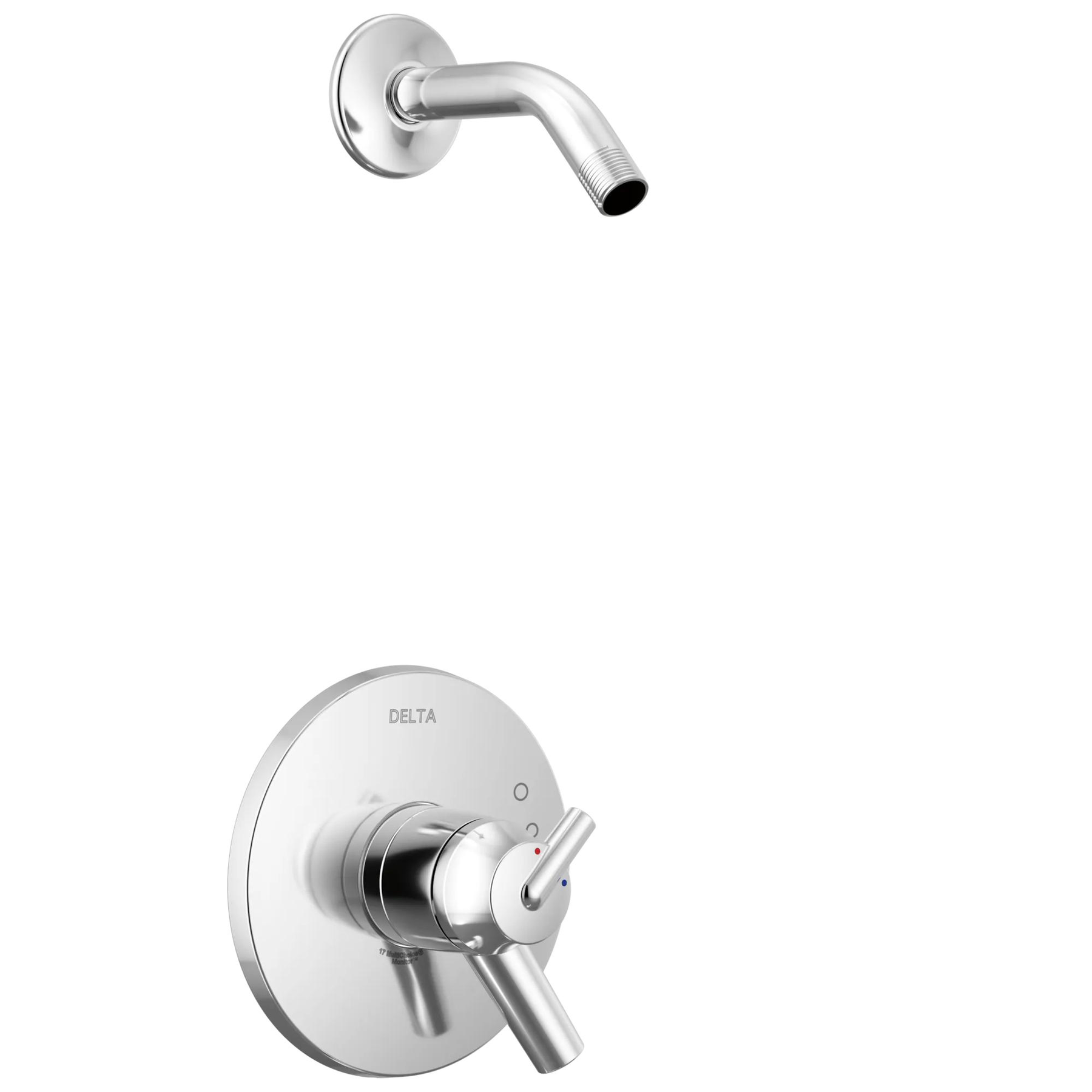
Monitor® 17 Series Shower Trim - Less Shower Head in Chrome
Model#:
T17259-LHD
Image Thumbnail, click to view zoomed product image
PRODUCT FEATURES
With separate handles for volume and temperature control, this Delta tub/shower provides a more refined showering experience. Simply set the water at your preferred temperature and turn the shower on or off with the volume control handle - without interrupting your set temperature. Chrome has rapidly become one of the most popular finishes across décor styles in the bath thanks to its stunning gloss and innate versatility. Paired with crisp lines and bright whites, it creates a bold, modern contrast, but it works equally well with vintage styles and traditional spaces to convey a hint of nostalgia.
- Control volume and water temperature independently with two separate handles for more refined control of your shower experience
- Trim kit only, must order MultiChoice Universal Valve separately to complete the unit
- ADA Compliant
- Assembled dimensions: 9 in. H x 9-1/4 in. D x 6-1/2 in. W
Technology and Special Features
ADA Compliant
ADA Compliant
Some people, and some local codes, require fixtures that are compliant with the Americans with Disabilities Act. If someone may visit who has special needs, or if you believe future buyers might appreciate this feature, Delta offers a range of compliant fixtures.
Monitor®
Monitor®
Delta Monitor® faucets feature pressure balance valves, which protect against sudden temperature or pressure changes to keep the water in the shower within a safe ±3.6° F.
Documents & Specs
Product Support, Repair Parts & Technical Specifications
Resources
Installation Information
Overall Height (in.) :
9
Valve Type:
Single-function pressure balance cartridge
INSTALLATION SUPPORT


Need help with installation? Find local Delta® installers. Get Quotes. Read reviews.
REVIEWS
Rated 2 out of
5
by
Give me a hot shower from
Temperature adjustment is bad
They look great but unlike some other valves adjusting the amount of hot water one gets is a pain, not very intuitive. Further we have great hot water everywhere but the thermostatic control doesn't allow for a nice hot shower which I prefer. Even my wife that prefers a cooler shower than I like thinks they don't work well. Everywhere in the house the hot water is MORE than sufficient. We have 2 of these we bought last summer and have been using since November. We have one more bathroom to use and hope to find another valve to use without so much restriction.
Date published: 2024-02-08
Rated 5 out of
5
by
Homeowner from
Clean, looks good
Works well for me. Nice to have the set temp option.
Date published: 2022-05-07
Rated 5 out of
5
by
TLG from
Nice Shower Fixture
[This review was collected as part of a promotion.] We are really happy with this shower fixture. It has clean lines. We did not include s shower head and chose one with a sprayer and hose for easier cleaning of the shower. I don’t love the exposed screw heads but can only really see one from outside of the shower.
Date published: 2019-11-18
Rated 5 out of
5
by
DebC from
Love the Sleek Modern Style
[This review was collected as part of a promotion.] Love the sleek look. For just a little more money, you get the dual function which allows you to adjust temperature and volume separately. My contractor said Delta has really upped their game with their rough-ins in the last year. He thinks it's the best price value in the market.
Date published: 2019-08-14
Rated 5 out of
5
by
Lori G from
Good looking, functional
I love being able to set the water temperature once and then every time I hope in the shower just turn on the water flow I want. It's also beautiful. The only small item is your plumber may have to make an adjustment on the temperature control to allow very hot showers if that is what you like.
Date published: 2019-02-09
Rated 5 out of
5
by
mae720 from
so far, so good...
... but, we haven’t been able to turn it on yet. contractor messed up the tile on the shower floor. it looks great, and I like that you can turn it off while showering (saving water with a ‘navy shower’!) — that’s become hard to find. I’ll come back and edit this once it’s running.
Date published: 2018-06-02
Rated 5 out of
5
by
RDH from
Beautiful and functional
My son installed this shower trim kit in my new shower, last month. It is great. The style is sleek and modern, which matches the other hardware in the bathroom. I like the fact that it turns on to my desired temperature every time. No more fiddling with the control to get to a comfortable temperature. There were no issues during the installation process.
Date published: 2018-03-03
Rated 4 out of
5
by
Sue from
Delta Trinsic Shower
They look great! Unfortunately I haven't installed them yet, they are for a new build, so I can't comment on how they work. Will try and come back after we've used them to give an informed review.
Date published: 2018-02-02
Q&A
Does this come in the Matte Black finish?
Hello Carrie13,
Thank you for your inquiry! The Delta Trinsic 17 Series Shower Trim-Less Shower Head T17259-LHD is only available in the Chrome and Stainless Steel finishes. However, we do manufacture the Delta Trinsic 17 Series H2Okinetic Shower Trim T17259-BL in the Matte black finish.
https://www.deltafaucet.com/bathroom/product/T17259-BL
Best regards,
Tanya
Date published: 2024-03-28
What is the difference between this and T17059?
These appear to be the same thing, but this one is less expensive for some reason.
Hi Ridge Dweller, Thank you for your question!
The T17259-LHD includes the valve control trim, shower arm and shower flange and the T17059 only includes the valve control trim.
Best regards,
Brandis
Date published: 2024-03-28
What is the shower arm and flange part #? I need to order one of each to match in a master shower.
Hi, Anthony82!
Thank you for your question. The shower arm flange part for the Delta T17259-LHD is RP6025. Here is a link to the part:
https://www.deltafaucet.com/parts-product-detail?modelNumber=RP6025
Best Regards, Rosanna
Date published: 2024-03-28
On this Trinsic Monitor 17 Series T17259-LHD I can't tell how far out from the wall the shower pipe extends -- not counting the shower head. Also, what are the low-flow shower heads you recommend pairing with this shower pipe?
Hi, Frank!
Thank you for your question. The Delta T17259-SSLHD Shower Arm measures 5.5" in length. Here is a link to our shower heads in the Brilliance Stainless Steel Finish:
https://www.deltafaucet.com/bathroom/showering/showerheads--handshowers?categories=Delta_Bathroom_Showering_Shower Heads & Hand Showers_Shower Heads&facetFinish=stainless
Best Regards,
Rosanna
Date published: 2024-03-28
What is the maximum volume for this model (T17259-SSLHD)?
Hello mcmarya!
Thank you for your question and we are happy to help! The Delta Monitor® 17 Series Shower Trim - Less Shower Head MODEL#: T17259-LHD has a Maximum of 1.75 GPM @ 80 psi, 6.6 L/min @ 550 kPa, and the tub port maximum flow rate of 6.2 GPM @ 60 psi with R10000-UNBX. With any further questions or concerns, please do not hesitate to reach out to us directly. Thank you for being a loyal Delta customer.
Best Regards,
Carrie
Date published: 2024-03-28
How do you remove the handles on T17259 LHD to inspect or replace cartridge?
Hello Michael!
Thank you for your question and we are happy to help! To remove the handle on the Monitor® 17 Series Shower Trim - Less Shower Head Model T17259-SSLHD, you will use a 1/8th allen wrench to take out the set screw from both handles. With any further questions or concerns, please do not hesitate to reach out to us directly. Thank you for being a loyal Delta customer.
Best Regards,
Carrie
Date published: 2024-03-28
Is there a way to adjust the temperature regulator to make the shower hotter?
Hi Jason, thank you for contacting Delta Faucet Company!
You shouldn't need to shut your water off but keep in mind it is still possible for the water to turn on if the stem is rotated. Please gather a philips screwdriver.
1. Please remove the temperature cap located on the tip of your handle by placing your fingers on the 'pointer' of the temperature cap and peeling upwards. This will be a little difficult as it is clipped into the temperature knob.
2. Once this piece is removed, you will see a plastic piece held in by a philips screwdriver. Please remove this part and be very careful not to drop the screw or the Rotational Limit Stop (looks like a black cog). Please note this black cog piece goes in one way.
3. Pull the black cog piece out enough for you to rotate it counter-clockwise and place it back in. You may need to hold it in place while you put the temperature knob back on with the screw.
4. Once you thread the screw in, please note not to over-tighten it as the cartridge temperature knob may not rotate if you do.
5. Please line the temperature cap perfectly with the temperature knob. Push straight down and you will hear a click.
*Please note there is a limit of how far this will rotate, if you rotate to the hottest setting it will be the same temperature as your water heater. This is not recommended as it can cause scalding. Please also note that each notch you rotate to can range anywhere between 4 and 16 degrees Fahrenheit.*
Please reach out with further questions!
Best Regards,
Kyra
Digital Communications Specialist
Date published: 2024-03-28
Delta Online Pricing
This online price is exclusive to DeltaFaucet.com. The list price may be shown on products offered outside of the Outlet section on DeltaFaucet.com. Strikethrough pricing may be used to show discounts.