In order for our team to best serve you, please email us using our CUSTOMER SERVICE FORM
If you need immediate assistance, you may call the Delta Commercial Helpline at 1-800-567-3300.
You can also mail us at:
Masco Canada Limited
350 South Edgeware Road St.
Thomas, ON N5P 4L1 Canada
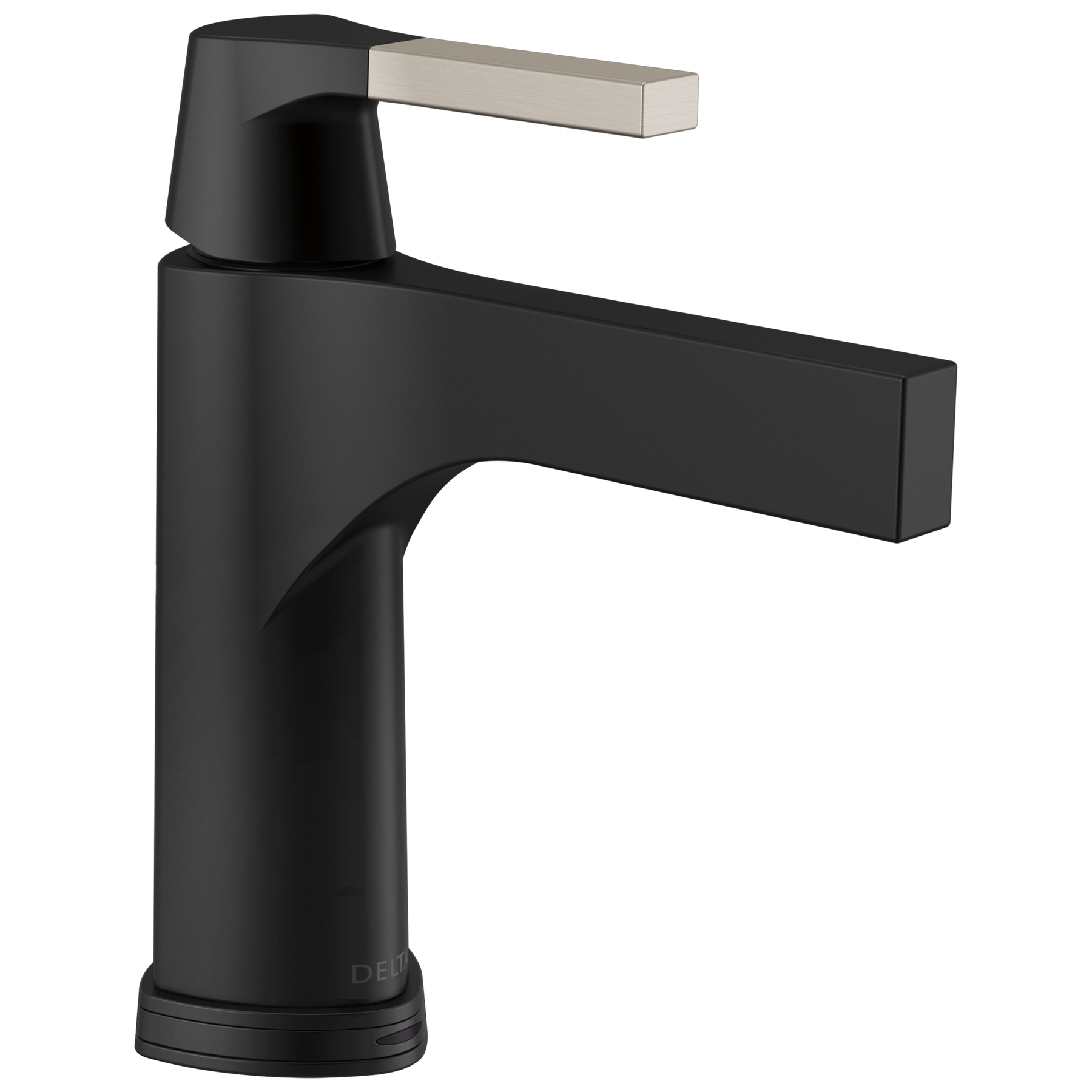
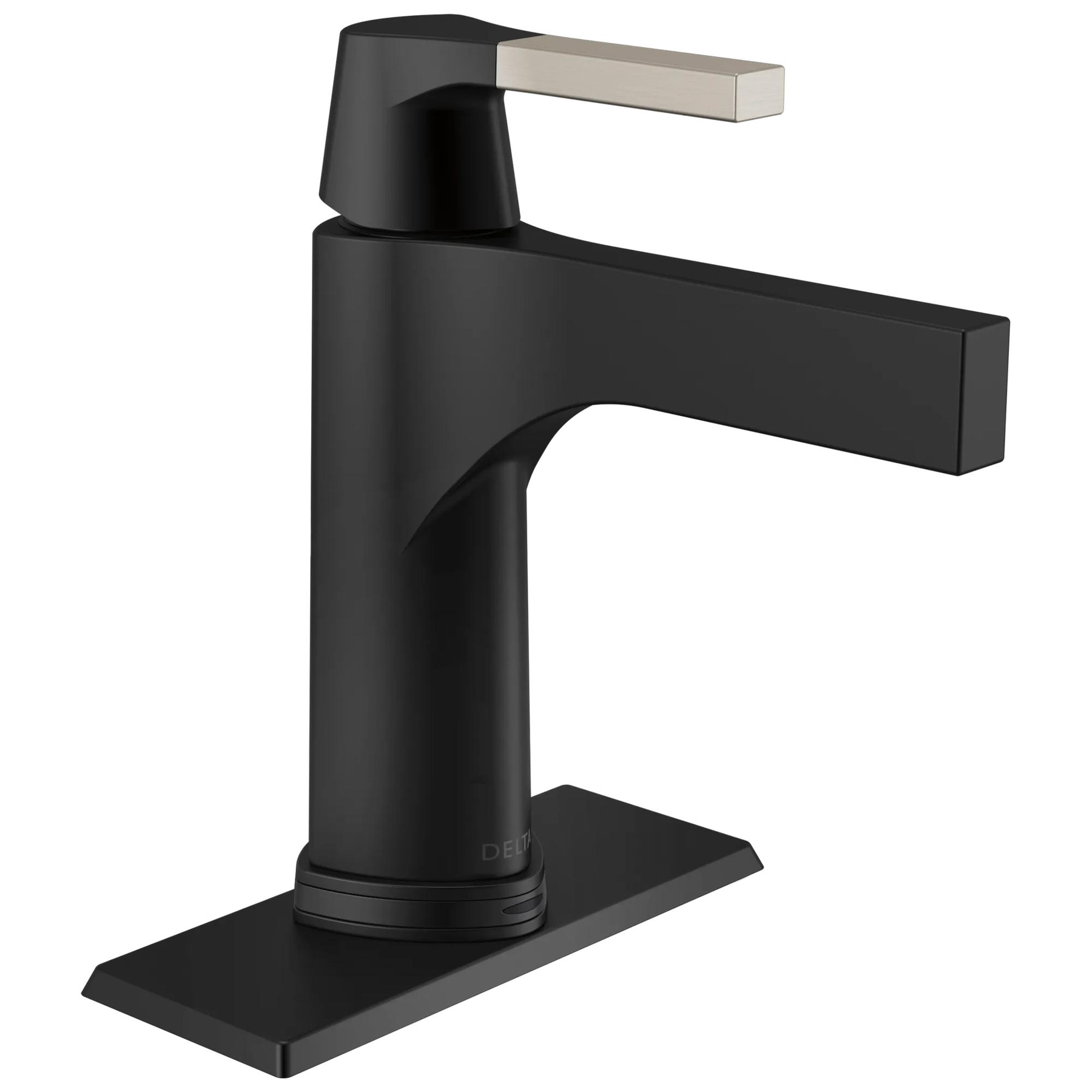
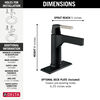
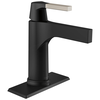
The Zura® design is a precise marriage of rounded, rectangular and triangular elements and offers innovative, geometric styling for your bath. Touch it on. Touch it off. Or go completely hands-free. Delta® Touch2O® with Touchless Technology helps keep your bathroom clean by giving you three ways to operate your faucet: manually with the handle, with a simple touch anywhere on the spout or handle, or by placing your hands near the faucet. The high-tech capacitance sensing capabilities of Touchless faucets allow the flow of water to be activated by breaking the capacitance field anywhere around the device, unlike traditional hands-free infrared sensors which require your hands be in a particular place and are sensitive to lighting conditions and clothing and skin color. WaterSense® labeled faucets use at least 20% less water than the industry standard — helping you save water without compromising performance. You can install with confidence, knowing that this faucet is backed by Delta Faucet's Lifetime Limited Warranty on non-electronic parts and finishes and 5-Year Limited Warranty on electronic parts.
Operate hands-free by placing your hands near the faucet, with just a touch anywhere on the spout or handle, or manually using the handle
Helps keep your faucet cleaner, because washing the mess off your hands shouldn’t involve making a mess of your faucet
Automatic water flow shut-off after two minutes helps conserve water
Batteries last approximately 1 year if using AA batteries (included) or 3 years if using C batteries (not included), based on 20 minutes of usage per day
Optional A/C adapter EP102157 may be ordered separately
Integrated TempSense® LED light shows water temperature, changing from blue to magenta to red as temperature increases
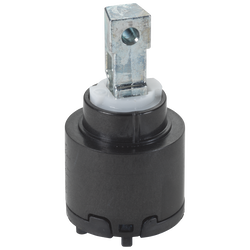
Diamond Seal® Technology is less hassle to install and helps your faucet perform like new for life, reducing leak points and lasting twice as long as the industry standard
Everything you need is together in one convenient box, including integrated InnoFlex® PEX supply lines
Laminar flow lends a beautiful, refined look that complements the design of the faucet
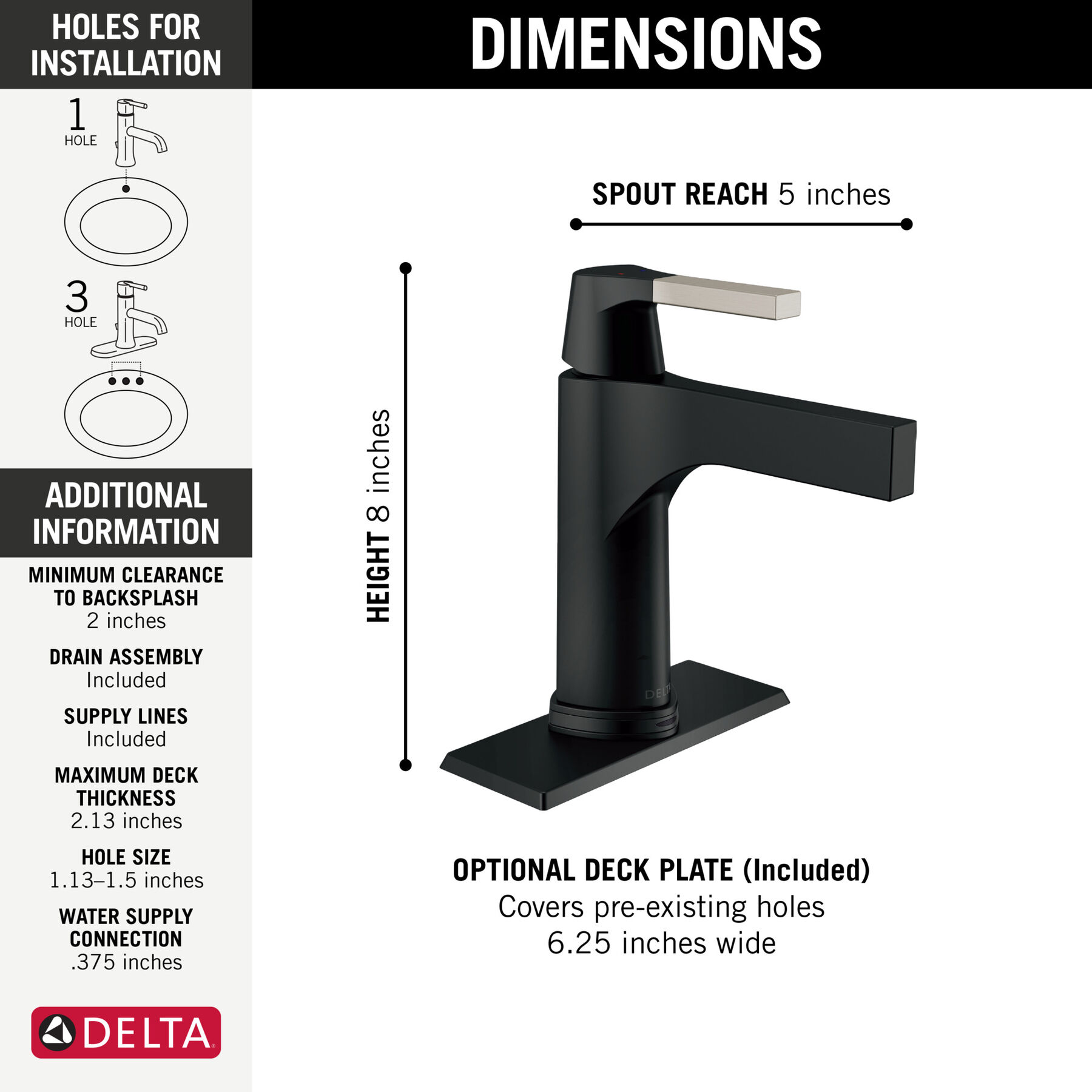
Fits 1- or 3-hole 4-inch installations
Optional deck plate in matching finish included for 3-hole installations
Optional red/blue temperature indicator ring included
Metal push pop-up drain assembly in matching finish (included) is ADA compliant and simple to install, operate and clean
ADA compliant
WaterSense® labeled faucet uses at least 20% less water than the industry standard without compromising performance
Rigid spout does not swivel
3/8-inch compression fittings
Backed by Delta Faucet's Lifetime Limited Warranty on non-electronic parts and finishes and 5-Year Limited Warranty on electronic parts
Special Information

California Prop 65 WARNING
CALIFORNIA PROP 65 WARNING
<b>WARNING: </b>Risk of cancer and reproductive harm from exposure to Lead. See www.P65Warnings.ca.gov.
Wash hands after installing or removing the product.
Eco-Friendly
WaterSense® Labeled
Technology and Special Features
ADA Compliant
ADA Compliant
Some people, and some local codes, require fixtures that are compliant with the Americans with Disabilities Act. If someone may visit who has special needs, or if you believe future buyers might appreciate this feature, Delta offers a range of compliant fixtures.
No-Lead Compliant
No-Lead Compliant
Tested and certified to NSF/ANSI Standard 61, which sets the criteria for product safety. The lined waterways in Delta® faucets help prevent leaching of metals.
DIAMOND™ Seal Technology is Delta’s revolutionary new water delivery system. An internal contact surface made up of tiny diamonds makes the valve leak-free and extraordinarily durable. It also keeps water free of contact with potential metal contaminants.
Touch2O® Technology lets you turn the water on or off just by touching any part of the handle or faucet. It’s more sanitary, and it lets you save water by stopping it momentarily when your hands are full and you don’t want to reach back and manually turn the handle.
Touchless Technology
Delta® Touch2O® with Touchless™ Technology allows you to simply place your hand near the faucet, tap the faucet surface, or use the standard handle activation to start and stop the flow of water.
Special Information
California Prop 65 WARNING
CALIFORNIA PROP 65 WARNING
<b>WARNING: </b>Risk of cancer and reproductive harm from exposure to Lead. See www.P65Warnings.ca.gov.
Need help with installation? Find local Delta® installers. Get Quotes. Read reviews.
Enter Valid Zip.
REVIEWS
Rated 2 out of
5 by
GreenfieldRHS from
Great features - terrible splashingWe've had these faucets in our primary bath for over a year. We want to love them, but the constant splashing of water out of the sink and the constant wiping up of water from the counter and floor is very frustrating.
Date published: 2021-09-17
Rated 5 out of
5 by
MountainGator from
Nice faucetNice style, well finished.
Date published: 2021-08-16
Rated 5 out of
5 by
SeaBee from
Love this faucet!Love this faucet! Works perfectly, it's modern, water saving and fun! A real conversation piece too.
Date published: 2021-08-01
Rated 5 out of
5 by
Kay55 from
Touchless faucetexcellent product. Ease of install
Date published: 2021-07-31
Rated 5 out of
5 by
C from
Love the Delta touchless faucets!I have this in chrome in one bathroom and black in the guest bathroom. The black is a touchless faucet and it works great. It is beautiful to look at and doesn't get hardwater spots. The chrome is just as beautiful, but I didn't want to go to the extra expense of a touchless model. I now wish I had done it as a touchless, since there is less water splashing around the touchless faucet, so it stays clean looking longer.
Date published: 2021-07-18
Rated 1 out of
5 by
LM5280 from
Terrible and VERY Expensive FaucetI would not recommend this Expensive faucet. Looks great, but does not function well. Arm is not long enough resulting in splattering water all over counter and floor.
Date published: 2021-03-05
Rated 1 out of
5 by
DS from
WATER SPLASHES EVERYWHEREI personally think its a design defect. the distance between the faucet and the water falling from the faucet is approx 3 inches. the minute you put your hand under the faucet to wash the water starts splashing on the sink counter and the faucet itself. We have to constantly wipe the sink and the faucet after each wash.
Returning the product. what a pain and waste of time and effort.
Date published: 2020-11-21
Rated 4 out of
5 by
tim44 from
Great faucets but confused by Touch vs senseThese are great faucets and am building a new house and have Delta touch faucets in Kitchen and both bathrooms. Kitchen faucet works with touch but not with sense. One bath works with both touch and sense. One bath works only with touch. I'm guessing the kitchen is designed for only touch, which is just fine. But why aren't both bathrooms working the same even though they have different faucets. Hard to find a clear answer on the internet. Would like to have touch and sense in both bathrooms if possible.
Part number for bath faucets that work with both touch and sense are: D574TBLDST Matte Black
Part number for bath faucet that works with touch only is: D761TSSDST Brilliance Stainless
Toughts Delta?
I need to make a repair on the 574T faucet. I do not see a set screw. Can anyone instruct me on how to disassemble the handle to make a cartridge / stem repair. thanks
Asked by: Bill V
Hello,
Thank you for your question!
To remove the handle you will press downward firmly on the handle and turn it counterclockwise until it completely unthreads from the valve.
Please reach out with further questions!
Best Regards,
Tim
Digital Communications Specialist
Answered by: Timothy
Date published: 2024-12-12
Is there an aerator?
Asked by: pinklady
Dear Pinklady,
Thank you for your inquiry! The Delta Zura Lavatory Touch2O 574T-CS-DST faucet has a RP90441 Stream Straightener in the end of the spout. It also has a flow restrictor RP75432 below the sink, where the hose connects. Please refer to below link of the parts diagram for this faucet.
https://media.deltafaucet.com/PartsDiagram/DPD-L-574T-DST.pdf
Best regards,
Tanya
Answered by: Tanya
Date published: 2017-06-03
Does RP75432 make water soft with bubbles like the usual aerators that fit to the faucet tip does or something like the water that comes out of https://www.deltafaucet.com/kitchen/product/9159T-DST
Asked by: Akhi
Hi, Akhi!
Thank you for your question. The water coming from the Delta 574T-CS-DST Faucet spout will come in a ribbon-like stream. Here is a link to a video to show the faucet turned on:
https://media.deltafaucet.com/elvis/Video/PRODUCT_574T-DST.mp4
Best Regards,
Rosanna
Answered by: Delta Faucet
Date published: 2024-03-28
The LED indicates the water temperature. It senses the water temperature flowing, or the temperature set by the handle?
Asked by: igorjrr
Hi, Igorjrr!
Thank you for your question. The Delta 574T-SS-DST Faucet Temperature Indicator indicates the temperature of the water flowing from the faucet.
Best Regards, Rosanna
Answered by: Delta Faucet
Date published: 2024-03-28
The touch-less sensing on this faucet sometimes causes the water to run when we don't want it to. Can the touch-less sensing be turned off so that we have to touch the faucet for the water to run?
Asked by: waltsteele
Thank you for your question. The Proximity/Hands-free feature can be turned off on the Delta Zura Lavatory Touch2O.xt Technology 574T-DST faucet. However, we do not make a touch lavatory faucet without the Proximity/Hands-free feature. Please review page 40 section labeled "De-activating Hands-free Mode", of the below Maintenance/Installation document for this faucet.
https://media.deltafaucet.com/QuickstartDiagram/QS-82105%20Rev%20G.pdf
Best regards,
Tanya
Answered by: Delta Faucet
Date published: 2024-03-28
How do you clean screen. Mine is clogged and water trickles out
Asked by: Ellen
Hi, Ellen!
Thank you for your question. The Delta 574T-DST faucet does have a stream straightener, RP90441. This can be pulled straight out of the spout to remove. Once removed, this can be soaked in a solution of 50% white vinegar and 50% water solution to clean. This can be soaked for an hour or overnight to clean any debris that maybe causing the flow issue.
Best Regards,
Rosanna
Answered by: Delta Faucet
Date published: 2024-03-28
What is the shape of the base? Is it a circle or ovoid or rounded square?
Asked by: JMO1
JMO1,
Thank you for your question! The body and base of the faucet have a rounded triangular shape.
Best regards, Jon
Answered by: Delta Faucet
Date published: 2024-03-28
Hello, sure hope you can help me out... I am struggling removing the stream straightener for the Delta Zura single handle faucet. I've read previous comments that will will pull out, but how do you recommend?
Regards,
-Tony
Asked by: Tony O
Hi, Tony O!
Thank you for your question. The Delta 574T-DST Faucet aerator assembly can be removed by pulling aerator straight out from the spout assembly by sing needle nose pliers or tweezers.
Best Regards,
Rosanna
Answered by: Delta Faucet
Date published: 2024-03-28
Where can I find the user manual for this faucet specifically?
Asked by: igorjrr
Hi, Igorjrr!
Thank you for your question. Here is a link to the Maintenance and Instruction Manual for the Delta 574T-SS-DST Faucet:
https://media.deltafaucet.com/MandI/106645%20Rev%20A.pdf
Best Regards, Rosanna
Answered by: Delta Faucet
Date published: 2024-03-28
Does it have to be installed on the sink? I wanted it to be counter mounted.
Asked by: marie
Dear Marie,
Thank you for your inquiry! The Delta Zura Lavatory 574T-DST faucet can be installed on your counter top instead of the sink. You would just need to make sure it has the proper clearance, the electronic parts and wires do not interfere with the sink and the supply lines reach your hot and cold shut off valves.
Best regards,
Tanya
Answered by: Tanya
Date published: 2017-02-21
I have a Delta Zura Lavatory Touch2O.xt Technology 574T-DST faucet. The proximity feature has quit working. I see instructions where it can be turned off on page 40 of the manual. How do I set it to turn proximity back on?
Asked by: Jerry
Hi Jerry,
Thank you for your question about the Delta Faucet model 574T-DST Zura® Single Handle Bathroom Faucet With Touch2O.Xt® Technology In Chrome. I apologize for the difficulty turning on the proximity setting. I know that can be frustrating. We are happy to help!
The process for turning on proximity mode is the same as for turning off proximity mode.
1) Put the handle in the off position
2) Wait 5 seconds
3) Tap the spout 6 times within 4 seconds.
4) Notice the indicator light in the faucet base flashes red & blue
5) As soon as the light stops flashing, tap the spout 6 times within 4 seconds.
6) The indicator light in the faucet base will flash red & blue again.
7) Proximity mode is now on.
It can take a couple of tries to get the 6 distinct taps in 4 seconds. Please reach out directly if you have any questions or need additional assistance. Thank you for being a loyal Delta Faucet customer.
Best Regards,
Bryan
Digital Communications Specialist
Answered by: Customer Service
Date published: 2024-03-28
I have installed the zura 2.0 Touchless faucet. In the off position the led light pulses blue on and off. In the On position the hands free sensor does not work. I have to touch the faucet in order for water to run.
Asked by: Nancy
Hello Valued Customer,
Thank you for contacting Delta Faucet Company!
We apologize for the inconvenience you are experiencing and we are happy to help! We have reached out to you directly to further assist you with this matter.
We appreciate your inquiry. Please reach out directly if you have further questions!
Best Regards,
Kyra
Digital Communications Specialist
Answered by: Customer Service
Date published: 2024-06-05
How long do batteries last in a typical 2-person household?
Asked by: The Professor
Hi Doctorj,
Thanks so much for contacting Delta Faucet Company about 574T-DST! Depending on usage, batteries will last up to two (2) years with normal use. We also manufacture an AC adapter for power instead of batteries.
Please contact us directly if you have any questions or need additional assistance.
Best Regards,
Nicole
Digital Communications Specialist
Answered by: Customer Service
Date published: 2024-01-31
Is there a soap dispenser that will match the brilliant stainless finish on a Zura faucet?
Asked by: Lisa
Hello!
Thank you for contacting Delta Faucet Company!
We do not have a specific soap dispenser for our Zura collection, however, please refer to the link below to see our soap dispensers in Stainless Steel!
https://www.deltafaucet.com/kitchen/accessories/soap-dispensers?cgid2=Delta_Kitchen_Accessories_Soap-Dispensers&prefn1=clearance&prefv1=false&prefn2=finish&prefv2=Stainless&prefn3=narrowResults&prefv3=hideDiscontinued&prefn4=recertified&prefv4=false
We appreciate your inquiry. Please reach out directly if you have further questions!
Best Regards,
Kyra
Digital Communications Specialist
Answered by: Delta
Date published: 2025-12-17
Can this model be used in conjunction with the voiceiq add on?
Asked by: Briguy
Hi Briguy,
Thank you for your question about the Delta Faucet model 574T-BL-DST.
Yes, this faucet can use the VoiceIQ module EP100855.
https://www.deltafaucet.com/parts/product/EP100855.html
Please reach out with any additional questions!
Best Regards,
Bryan
Digital Communications Specialist
Answered by: Customer Service
Date published: 2024-06-27
The flow out of the faucet has slowed significantly. How do I clean it?
Asked by: Bill
Hi Bill,
Thank you for your question about the Delta Faucet model 574T-SS-DST.
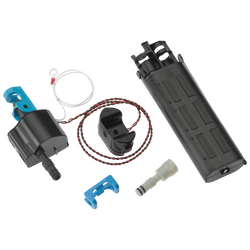
If the flow is reduced, clean the flow restrictor located in the hose connection below the sink. Also, remove the debris filter inside the solenoid with tweezers or pliers and clean the filter. See the parts diagram for more information:
https://media.deltafaucet.com/PartsDiagram/DPD-L-574T-DST%20Rev%20K.pdf
Please reach out with any additional questions!
Best Regards,
Bryan
Answered by: Delta
Date published: 2025-11-25
Is this faucet available with a 0.5 GPM aerator? I need it to be 0.5 GPM and not 1.2 GPM.
Asked by: Todd
Hello Todd,
Thank you for your question! I am happy to help you!
For our Delta 574T-BL-DST has a flow restrictor of .5. The RP73837 is what will determine the amount of water flow.
Please contact us back for any further questions.
Best Regards,
Nicole
Answered by: Delta7
Date published: 2024-03-28
Does the handle needs to be on the "on" position for the touchless feature to work? If the handle needs to be on the "on" position for the touchless feature to work, what are the disadvantages if the handle is always left on the "on" position?
Asked by: MelMel
Hello MelMel,
Thank you for contacting us, I would be happy to help you.
The handle on the model 574T-CS-DST does have to be in a "ON" position for the touch function to work also, the handle being on has no known disadvantages
Please contact us back if you have any questions or need further assistance.
Best Regards,
Nicole
Answered by: Delta7
Date published: 2024-03-28
how do you get the faucet to act like a faucet and run continuously while shaving?
Asked by: Shannon
Hi Shannon,
Thank you for your question about the Delta Faucet model 574T-DST.
The faucet will flow for up to two minutes, there is an automatic shut-off. To disable the electronic features, the easiest way is to disconnect the battery cap or power while the faucet is running. Then the faucet will function manually only.
Please reach out with any additional questions!
Best Regards,
Bryan
Digital Communications Specialist
Answered by: Customer Service
Date published: 2024-03-11
My touch/touch-less Delta faucet will turn on and off without anyone being in the room. Sometimes it will do this several times in a couple of minutes wasting a lot of water. I changed the batteries (c cell) and it still turns on/off by itself.
Asked by: Chicago_Rob
Hello Valued Customer,
Thank you for contacting Delta Faucet Company!
We apologize for the issues you are experiencing and we are happy to help! We have reached out to you directly to further assist you with this matter.
We appreciate your inquiry. Please reach out directly if you have further questions!
Best Regards,
Kyra
Digital Communications Specialist
Answered by: Delta
Date published: 2025-03-03
Is there an option to get the Zora black faucet with just the sensor and not a handle? The jurisdiction I would be installing it in only allows sensor only faucets, no manual option.
Asked by: Jose
Hello Jose!
Thank you for your question and we are happy to help! There is not an option to get the Delta ZURA®
Single Handle Bathroom Faucet With Touch2O.Xt® Technology MODEL#: 574T-BL-DST without the handle. With any further questions or concerns, please do not hesitate to reach out to us directly. Thank you for being a loyal Delta customer.
Best Regards,
Carrie
Answered by: Delta7
Date published: 2024-03-28
how to change/clean the stream straightener for a 574-MPU-DST
Asked by: John Matthew
Hi John Matthew,
Thanks so much for contacting Delta Faucet Company!
We recommend you try soaking the product in a 50/50 solution of water and white distilled vinegar. This could break up any possible calcium buildup inside.
Please reach out with further questions!
Best Regards,
Kelley
Digital Communications Specialist
Answered by: Customer Service
Date published: 2024-07-01
Will this faucet work if the power is out? We intend to use the AC converter.
Asked by: Colin
Hello,
Thank you for your question!
Yes, you can still use the faucet with the handle if the power goes out.
Please reach out with further questions!
Best Regards,
Tim
Digital Communications Specialist
Answered by: Customer Service
Date published: 2024-10-08
I notice the touch function is will working properly but the sensor on my 574T-DST is no longer working. Is it because of disabling touchless mode? If so, how do I re-enable the mode?
Asked by: John
Hi John,
Thanks so much for contacting Delta Faucet Company about your 574T-DST!
We would recommend a LED reset and flush, please see the instructions for the reset below and the link to the installation sheet showing the flush on page 6.
https://media.deltafaucet.com/MandI/106645%20Rev%20B.pdf
Start the reset by removing the battery box from the battery wire, waiting a full minute, inserting brand-new batteries into the battery box, and then reconnecting the battery box to the battery box wire. Allowing the full minute without the battery box connected will allow time for any remaining electricity in the solenoid to drain, resetting it.
Please contact us directly if you have any questions or need additional assistance.
Best Regards,
Nicole
Digital Communications Specialist
Answered by: Customer Service
Date published: 2024-03-28
The sensing for the touch free mode is not working. There is information on how to disable the touch free feature, yet know information on how to enable it. How do I enable the touch free feature? In touch mode, auto shutoff is 2 minutes, why?
Asked by: Mark
Hi Mark,
Thank you for your question about the Delta Faucet model 574T-BL-DST Zura® Single Handle Bathroom Faucet With Touch2O.Xt® Technology In Matte Black. We will be happy to assist you as quickly as possible.
The faucet will turn off after two minutes as a safety feature in case of accidental activation. To enable the Touch2O.Xt proximity sensing, the process is the same as disabling the proximity sensing.
1. Put the handle in the off position
2. Wait 5 seconds
3. Tap the spout 6 times within 4 seconds.
4. Notice the indicator light in the faucet base flashes red & blue
5. As soon as the light stops flashing, tap the spout 6 times within 4 seconds.
6. The indicator light in the faucet base will flash red & blue again.
7. Proximity mode is now on.
Use firm presses like a piano key.
Please contact us directly if you have any questions or need additional assistance. We appreciate your business and look forward to continuing to serve you!
Best Regards,
Bryan
Digital Communications Specialist
Answered by: Customer Service
Date published: 2024-03-28
I've installed this faucet in a dental clinic and my client told me that the Prox mode is too sensitive. When they are around the cabinet, the faucet opened even though they are at 36" from it. Is there a mean to diminish the sensitivity ? Thank you
Asked by: CiBi
Hello Robert,
Thank you for your question about your Delta Faucet model 597LF-PNMPU. We are happy to assist you!
We have reached out to you directly. We would be more than happy to assist in getting this issue resolved.
We look forward to better serving you in the future.
Best Regards,
Themar
Digital Engagement Specialist
Answered by: Customer Service
Date published: 2024-03-28
When I plug in the A/C adapter EP73954, the touch feature is not responsive. However, the touch feature works just fine when the faucet operates on battery power only. What might be causing the issue?
Asked by: Chris
Hello Chris,
Thank you for your question about the Delta Faucet model 574T-DST. I apologize the AC adapter is not working. I know that can be frustrating. We are happy to help!
The faucet may not be properly grounded when using the adapter. I recommend checking that the outlet is powered, unswitched, and grounded. Keep all the wires separated by 2" and place the battery box flat on the ground.
Please reach out at customerservice@deltafaucet.com or contact our Touch2O concierge service at 844-923-5368 if you have any questions or need additional assistance. Thank you for being a loyal Delta Faucet customer.
Best regards,
Bryan
Answered by: Customer Service
Date published: 2024-03-28
Does the handle need to stay up in order for the touchless feature to work?
Asked by: Nancy
Hi Valued Customer,
Thank you for contacting Delta Faucet Company!
For the touchless feature to work properly, the handle will need to be in the open position. This will also allow you to turn the handle to the set temperature you would like!
We appreciate your inquiry. Please reach out directly if you have further questions!
Best Regards,
Kyra
Digital Engagement Specialist
Answered by: Customer Service
Date published: 2024-05-13
Why is the water pressure low on our bathroom sink. The one in the other bath is fine.
Asked by: Terry from SC
Hello Valued Customer,
Thanks so much for contacting Delta Faucet Company!
It is possible that a flush could resolve this issue with the Zura® Touch2O® Bathroom Faucet with Touchless Technology Model#: 574T-DST. To do this Keep the handle in the off position. Remove the clip that is attached to the braided hose on the bottom of the solenoid. After the hose is removed, place a bucket under the solenoid, and then open the handle. It's helpful to have someone control the handle while the other person is in the cabinet with the bucket.
We would also advise flushing the hot and cold lines.
1. Please be sure to turn the water supply off before beginning this process.
2. Move the handle to the full mixed position.
3. Disconnect the faucet supply line from the hot side.
4. Position a bucket with the supply line connection inside the bucket.
5. Turn on the supply stop on the connected supply line side slowly, directing the water from the disconnected side into the bucket.
6. Reconnect the supply line.
*Please use caution when flushing the hot water.*
You'll want to repeat steps 1-6 for the cold side. Once you've done the flushing, you can turn the water supply back on to the faucet.
Please reach out with further questions!
Best Regards,
Kelley
Digital Communications Specialist
Answered by: Customer Service
Date published: 2024-10-22
I’m confused about your finishes. In Lowes I’m seeing “brushed nickel” but online I’m seeing “polished nickel” and “stainless”. Is “stainless” a matte finish? That’s what we are looking for.
Asked by: Jesse Chipps
Hello Jesse!
Thank you for your question and we are happy to help. The Delta Zura® Single Handle Bathroom Faucet With Touch2O.Xt® Technology In Stainless MODEL#: 574T-SS-DST "Stainless Steel" or "Brushed Nickel" finishes are not Matte. They have a brushed look to them. With any further questions or concerns, please do not hesitate to reach out to us again. Thank you for being a loyal Delta Faucet customer.
Best Regards,
Carrie
This online price is exclusive to DeltaFaucet.com. The list price may be shown on products offered outside of the Outlet section on DeltaFaucet.com. Strikethrough pricing may be used to show discounts.
ATTENTION
This link will take you out of the International section and direct you to another page.