
If the handle or spout doesn’t respond to touch, check the batteries. Make sure the batteries are new and properly loaded in the battery box, and that power is available. For models made before February 2009 check that the grounding clips are connected properly.as described in the Maintenance and Installation Guide, and that the faucet is grounded to an electrical or plumbing line. Grounding is not required on faucets with Touch2O® Technology manufactured after February, 2009. If your faucet does not have a green ground wire, it may not require grounding. Check to be sure all electrical connections are solid.
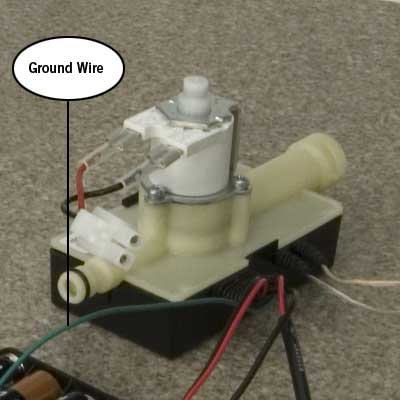
It is possible that the spout is in electrical contact with the sink. Make sure the spout insulating elements are in place and, again, check for proper grounding.
The valve may simply not be turned on. Make sure the handle is in the ON position and that power is available.
It could also be that the user is not touching the faucet properly. Make sure the touch is not too long or too short — it should be deliberate, like striking a key on a piano. Don’t use fingernails or a dry cloth to touch the faucet.
Finally, the unit may need to reset. Disconnect the battery, wait 30 seconds, then reconnect the battery.